
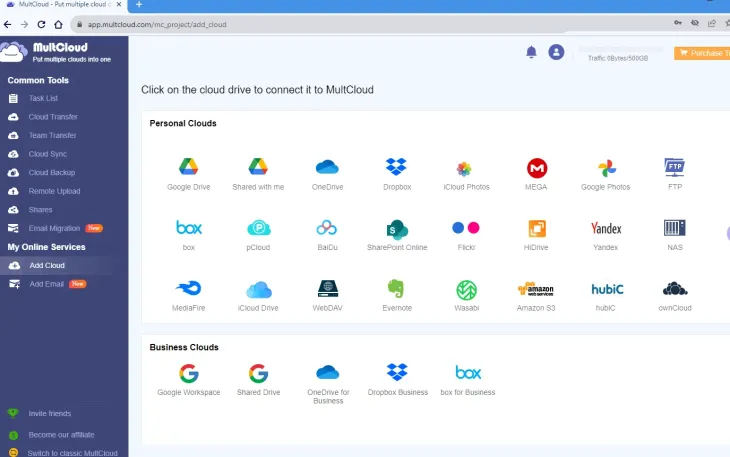
If you use more than one cloud storage service — like Google Drive for work, Dropbox for personal files, and OneDrive for backups — you already know the pain of managing them. Switching between accounts, searching for files, and manually moving data from one service to another gets old very fast. that’s exactly the problem multicloud Was created to solve.
MultCloud is a free web-based cloud storage manager that lets you connect all your cloud accounts in one place. You can transfer files between them, set up automatic sync and even schedule backups without downloading a single file to your computer.
And right now, you can catch 200GB lifetime bandwidth + all premium features for 1 year, completely free. Here’s everything you need to know.
What is multicloud?
MultCloud is a browser-based tool that acts as a universal file manager for the cloud. Instead of logging into Google Drive, then Dropbox, then OneDrive separately, you connect them all to MultiCloud and manage everything from a single dashboard.
It supports over 30 popular cloud services, including Google Drive, Dropbox, OneDrive, OneDrive for Business, Amazon S3, MEGA, Box, pCloud, Flickr, FTP, NAS, iCloud Drive, iCloud Photos, Wasabi, Backblaze, and more. The free plan gives you 5GB of monthly transfer data, while the premium plan unlocks much more.

MultiCloud’s clean dashboard lets you manage all your connected cloud drives from one screen
Key Features of MultiCloud Premium
1. Cloud Transfer – Transfer files without downloading
The Cloud Transfer feature lets you transfer files directly from one cloud service to another. The transfer happens on MultCloud’s servers, so your computer doesn’t need to be on. This is a big time saver when transferring large amounts of data – for example, moving your Google Drive files to Dropbox or copying files from Amazon S3 to OneDrive.
2. Cloud Sync – Keep files up to date across services
With cloud sync, you can keep folders in two different cloud drives in sync. MultiCloud supports 10 sync modes, including one-way sync, two-way sync, and real-time sync. You can also schedule the sync to run automatically at set intervals – daily, weekly, or monthly. This is great for keeping backups running without any manual effort.
3. Cloud Backup – Keep your data safe
Cloud backup lets you back up data from one cloud to another. If something goes wrong – accidental deletion, ransomware, or service outage – you can restore your files from a saved backup version. Think of it as a second copy of your data stored safely in a different location.
4. Works with 30+ cloud storage services
MultiCloud connects to almost every major cloud platform – Google Drive, Google Photos, Google Workspace, Dropbox, Dropbox Business, OneDrive, OneDrive for Business, SharePoint, MEGA, FTP/SFTP, Amazon S3, Box, pCloud, Flickr, NAS, MediaFire, Wasabi, Backblaze, Evernote, and many others. All of these are available to join for free when you sign up.
5. Email Migration
MultiCloud can transfer emails between providers or save Gmail messages as PDFs directly to your cloud drive. You can filter by date, sender or subject and schedule bulk exports – useful if you’re changing email providers or just want an offline backup of important conversations.
6. Remote Upload
You can save files from URLs, magnet links or torrent files directly to your cloud drive – without downloading them to your PC first. The file goes directly from the Internet to your cloud storage.
7. Strong security
MultiCloud uses 256-bit AES encryption to protect data during transfer. Two-factor authentication (2FA) is supported for additional account security, and the platform is fully GDPR-compliant. Your login credentials for linked services are never stored on MultiCloud’s servers – it uses OAuth-based authorization where possible.
MultCloud Free vs Premium – What’s the difference?
| Speciality | free plan | premium plan |
|---|---|---|
| monthly data transfer | 5 GB | 100 GB – Unlimited |
| move threads | 2 threads | 10 threads (fast) |
| scheduled transfer | No | Yes |
| real-time sync | No | Yes |
| sync mode | 2 basic modes | 10 sync mode |
| email transfer | 50/month | unlimited |
| priority support | No | 24/7 priority support |
The gift below gives you 200GB of lifetime bandwidth (it never expires) and all premium features for a full year – which normally costs around $40.
How to Claim: MultiCloud Free 200GB Bandwidth + 1-Year Premium Giveaway

Enter the giveaway code in the Keys section of your MultiCloud account to unlock 200GB lifetime bandwidth and 1-year premium access.
Follow these steps carefully to redeem your free MultiCloud Premium access:
- go to multicloud signup page And create a free account using your email and password.
- Check your inbox and confirm your registration via the verification email sent to you.
- Once logged in, click “key” icon In the upper-right corner of the dashboard.
- Enter the giveaway license code in the given field and click “Ok”: :
Giveaway Code: Shareware06ONSAL
That’s all – your account will be upgraded with 200GB lifetime bandwidth and full premium access for 1 year.
Free License Terms
- contains one 1 year subscription On MultiCloud with all advanced premium features
- comes with 200GB data traffic for lifetime (Does not expire after 1 year)
- Available to individuals and small-to-medium businesses
- Free technical support included during the license period
Is multicloud worth it?
If you regularly transfer or sync files between cloud services, multicloud saves a lot of time. Instead of downloading files from Dropbox and re-uploading to Google Drive (or using a slow manual process), MultCloud does it server-side in the background. With 10 transfer threads on the Premium plan, larger transfers finish much faster than the free tier.
This is especially useful for people who store photos in Google Photos and Dropbox, manage team files in Google Workspace and OneDrive for Business, or want to keep a backup copy of important folders in another cloud service. If you’ve been thinking about trying out a proper cloud manager, this free deal is a great time to do so.
For more free software deals and goodies, check out our coverage of CBackup Professional Free and Abelssoft SyncManager Free Full Edition – both are solid tools worth grabbing when they’re available.
Learn more from Techno360
Subscribe to get the latest posts delivered to your email.